Workflow
For radio, pages are used as workflow orchestrators, it means that each page handles:
- Workflow naming
- Standard and specific tools calling (steps and dedicated elements)
- Information retrieval and displaying all along steps (also called RadioInfoHeader)
- Any specific process handling (e.g. if data provided to RadioInfoHeader change during the workflow)
In the continuity of the first-step, we will take a look on stock-management/pallet-movement as an example.
Determine prerequisites
First things to consider when building a workflow are:
- Determine the process name: this will be used to centralize information and ensure data persistence in a secured way all along the process
- Determine steps necessary to reach the expected purpose of this module
- Check if each step already exist in the standard tool box see radio tools
For the pallet movement example we took, the expected workflow is:
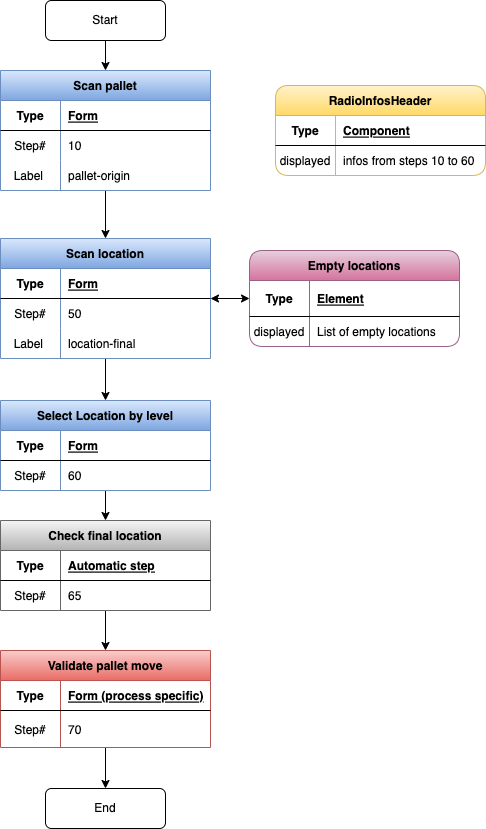
Create standard values
To handle workflow as described, some standard values are required as described below:
pages/pallet-movement.tsx - necessary variables
const { t } = useTranslation();
const router = useRouter();
//To make secured local storage available for the page:
const storage = LsIsSecured();
//To trigger page rendering each time a step is passed or failed:
const [triggerRender, setTriggerRender] = useState < boolean > true;
//To initialize displayed values (and handle if display changes during the process)
const [originDisplay, setOriginDisplay] = useState < any > {};
const [finalDisplay, setFinalDisplay] = useState < any > {};
const [headerContent, setHeaderContent] = useState < boolean > false;
const [displayed, setDisplayed] = useState < any > {};
// to initialize specific displayed values at a given step (here will be used at step 50)
const [showEmptyLocations, setShowEmptyLocations] = useState < boolean > false;
//define workflow parameters
const workflow = {
  processName: "palletMvt",
  expectedSteps: [10, 50, 60, 65, 70],
};
//Retrieve information
const palletMvt = JSON.parse(storage.get(workflow.processName) || "{}");
Implement necessary functions
And some standard function are required too:
pages/pallet-movement.tsx - necessary functions
//initialize workflow on step 0
if (Object.keys(palletMvt).length === 0) {
  palletMvt[`step${workflow.expectedSteps[0]}`] = { previousStep: 0 };
  palletMvt["currentStep"] = workflow.expectedSteps[0];
  storage.set(workflow.processName, JSON.stringify(palletMvt));
}

//Specific function to retrieve information to display in RadioInfosHeader
useEffect(() => {
  const object: { [k: string]: any } = {};
  if (palletMvt[`step${workflow.expectedSteps[0]}`]?.data?.handlingUnit) {
    const handlingUnit =
      palletMvt[`step${workflow.expectedSteps[0]}`]?.data?.handlingUnit;
    object[t("common:pallet-code")] = handlingUnit.code;
    object[t("common:location-origin_abbr")] = handlingUnit.location.name;
  }
  if (
    palletMvt[`step${workflow.expectedSteps[1]}`]?.data?.locations &&
    palletMvt[`step${workflow.expectedSteps[1]}`]?.data?.locations?.length > 1
  ) {
    const locationsList =
      palletMvt[`step${workflow.expectedSteps[1]}`]?.data?.locations;
    object[t("common:location-final_abbr")] = locationsList[0].barcode;
  }
  if (palletMvt[`step${workflow.expectedSteps[2]}`]?.data?.chosenLocation) {
    const location =
      palletMvt[`step${workflow.expectedSteps[2]}`]?.data?.chosenLocation;
    object[t("common:location-final_abbr")] = location.name;
  }
  setOriginDisplay(object);
  setFinalDisplay(object);
}, [triggerRender]);

useEffect(() => {
  headerContent ? setDisplayed(finalDisplay) : setDisplayed(originDisplay);
}, [originDisplay, finalDisplay, headerContent]);

// To reset values to zero and restart process from start
const onReset = () => {
  storage.removeAll();
  setHeaderContent(false);
  setShowEmptyLocations(false);
  setTriggerRender(!triggerRender);
};

// To reset values to zero and go back to previous page
const previousPage = () => {
  router.back();
  storage.removeAll();
  setHeaderContent(false);
  setShowEmptyLocations(false);
};
Steps rendering
Once all those are ready to use, we can start calling necessary items:
pages/pallet-movement.tsx - rendering
{
    return (
        <PageContentWrapper>
            {/*title and process buttons section */}
            <HeaderContent
            title={t("common:movement")}
            actionsRight={
                <Space>
                {palletMvt.currentStep > workflow.expectedSteps[0] ? (
                    <NavButton icon={<UndoOutlined />} onClick={onReset}></NavButton>
                ) : (
                    <></>
                )}
                <NavButton
                    icon={<ArrowLeftOutlined />}
                    onClick={previousPage}
                ></NavButton>
                </Space>
            }
            />
            {/* RadioInfosHeader seciton displayed if soem informaiton are present*/}
            {Object.keys(originDisplay).length === 0 &&
            Object.keys(finalDisplay).length === 0 ? (
            <></>
            ) : (
            <RadioInfosHeader
                input={{
                displayed: displayed,
                }}
            ></RadioInfosHeader>
            )}
            {/* Specific element section : here it will be called if showEmptyLocation is
            required in step 50*/}
            {showEmptyLocations &&
            palletMvt[`step${workflow.expectedSteps[0]}`].data.handlingUnit
            .handlingUnitContent ? (
            <EmptyLocations />
            ) : (
            <></>
            )}
            {/* Steps management section*/}
            {!palletMvt[`step${workflow.expectedSteps[0]}`]?.data ? (
            <ScanPalletForm
                process={workflow.processName}
                stepNumber={workflow.expectedSteps[0]}
                label={t("common:pallet-origin")}
                trigger={{ triggerRender, setTriggerRender }}
                buttons={{ submitButton: true }}
            ></ScanPalletForm>
            ) : (
            <></>
            )}
            {palletMvt[`step${workflow.expectedSteps[0]}`]?.data &&
            !palletMvt[`step${workflow.expectedSteps[1]}`]?.data ? (
            <ScanLocationForm
                process={workflow.processName}
                stepNumber={workflow.expectedSteps[1]}
                label={t("common:location-final")}
                trigger={{ triggerRender, setTriggerRender }}
                buttons={{
                submitButton: true,
                backButton: true,
                emptyButton: true,
                }}
                headerContent={{ headerContent, setHeaderContent }}
                showEmptyLocations={{ showEmptyLocations, setShowEmptyLocations }}
            ></ScanLocationForm>
            ) : (
            <></>
            )}
            {palletMvt[`step${workflow.expectedSteps[1]}`]?.data &&
            !palletMvt[`step${workflow.expectedSteps[2]}`]?.data ? (
            <SelectLocationByLevelForm
                process={workflow.processName}
                stepNumber={workflow.expectedSteps[2]}
                buttons={{ submitButton: true, backButton: true }}
                trigger={{ triggerRender, setTriggerRender }}
                locations={palletMvt[`step${workflow.expectedSteps[1]}`].data.locations}
            ></SelectLocationByLevelForm>
            ) : (
            <></>
            )}
            {palletMvt[`step${workflow.expectedSteps[2]}`]?.data &&
            !palletMvt[`step${workflow.expectedSteps[3]}`]?.data ? (
            <CheckFinalLocationPalletForm
                process={workflow.processName}
                stepNumber={workflow.expectedSteps[3]}
                trigger={{ triggerRender, setTriggerRender }}
                articleId={
                palletMvt[`step${workflow.expectedSteps[0]}`].data.handlingUnit
                    .handlingUnitContent[0].articleId
                }
                originLocationId={
                palletMvt[`step${workflow.expectedSteps[0]}`].data.handlingUnit
                    .locationId
                }
                destinationLocation={
                palletMvt[`step${workflow.expectedSteps[2]}`].data.chosenLocation
                }
                headerContent={{ setHeaderContent }}
            ></CheckFinalLocationPalletForm>
            ) : (
            <></>
            )}
            {palletMvt[`step${workflow.expectedSteps[3]}`]?.data ? (
            <ValidatePalletMoveForm
                process={workflow.processName}
                stepNumber={workflow.expectedSteps[4]}
                buttons={{ submitButton: true, backButton: true }}
                trigger={{ triggerRender, setTriggerRender }}
                headerContent={{ setHeaderContent }}
            ></ValidatePalletMoveForm>
            ) : (
            <></>
            )}
        </PageContentWrapper>;
    );
}