Families
Create a family page
The page will follow exactly same principles as in the web part: More about creating a page
Reference it to access it
Default structure is the following one:
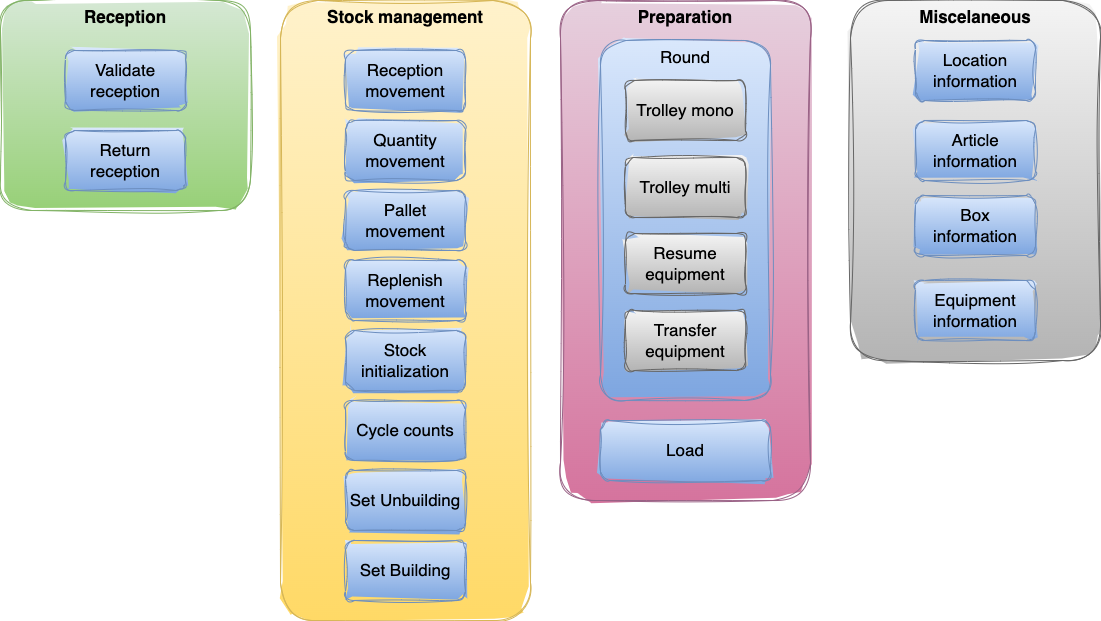
Each family has its own menu page built as in the following example:
pages/stock-management.tsx
import MainLayout from "components/layouts/MainLayout";
import { FC } from "react";
import { HeaderContent, MenuItem } from "@components";
import useTranslation from "next-translate/useTranslation";

type PageComponent = FC & { layout: typeof MainLayout };

const menuItemDatas = [
  {
    title: "menu:reception-movement",
    path: "/reception_movement",
  },
  {
    title: "menu:quantity-movement",
    path: "/quantity-movement",
  },
  {
    title: "menu:pallet-movement",
    path: "/pallet-movement",
  },
  {
    title: "menu:replenishment-movement",
    path: "/replenish-movement",
  },
  {
    title: "menu:stock-init",
    path: "/stock-init",
  },
  {
    title: "menu:cycle-counts",
    path: "/cycle-counts",
  },
  {
    title: "menu:set-unbuilding",
    path: "/set-unbuilding",
  },
  {
    title: "menu:set-building",
    path: "/set-building",
  },
];

const StockManagementPage: PageComponent = () => {
  const { t } = useTranslation();
  return (
    <>
      <HeaderContent title={t("menu:stock-management")} />
      {menuItemDatas.map(function (data, index) {
        return <MenuItem key={index} title={t(data.title)} path={data.path} />;
      })}
    </>
  );
};

StockManagementPage.layout = MainLayout;

export default StockManagementPage;
This page displays the menu allowing to access each process page. So to provide acces to a given page, we have to enter its title and relative path in menuItemDatasobject. It will then be sent to a standard components that are <HeaderContent> and <MenuItem>.
According to default structure, there are so 4 default pages menu files:
- reception.tsx
- stock-management.tsx
- preparation.tsx
- misc.tsx