Radio "toolbox" - Forms
Forms tools
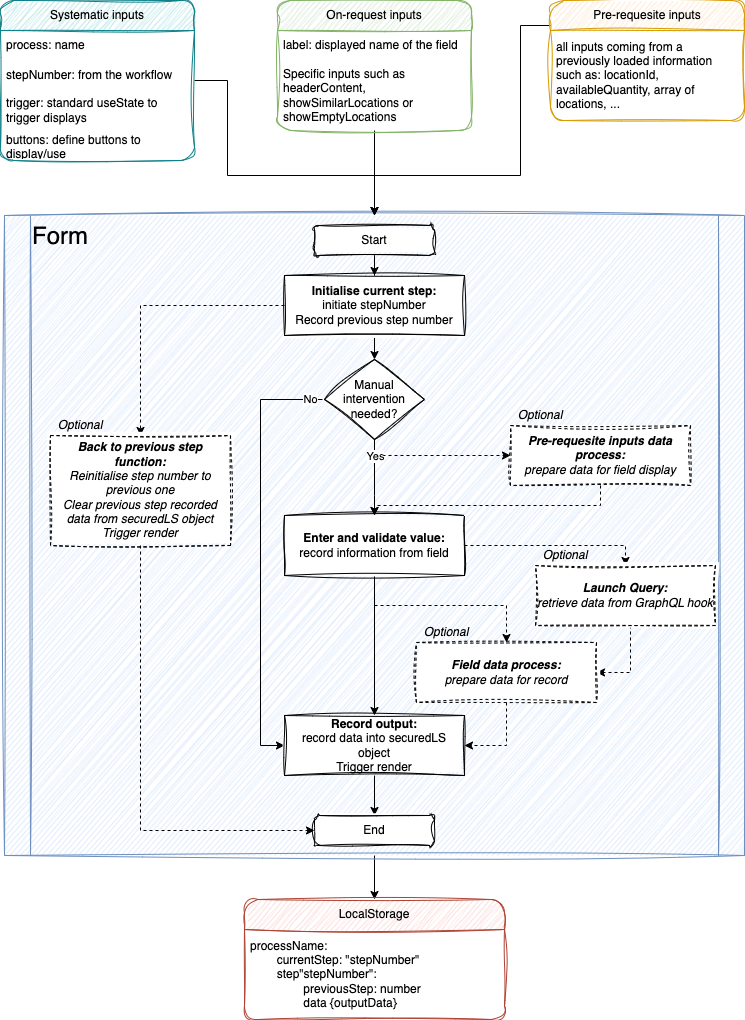
The general way of working of a Form tool is the following one:
caution
Notice that a form have mandatory items:
- Systematic inputs: those inputs are needed in any radio module to send informaiton from Workflow page to form tools
- Initialise current step: this is mandatory since it will condition workflow path in the secured storage and thus will ensure the actually taken path
- Record output: this is mandatory since it will trigger display rendering when going to next process step (or back to first step for final step)
- Back to previous step: this is mandatory since this will be condition the path when this button is pushed.
Obviously, this function will not be called when tool is placed in the first position or the workflow.
Form buttons
Form buttons are managed via a component named RadioButtonsstored in components/common/dumb/Buttons/.
Currently, this component contents:
- submitButton: show button to validate the current step
- backButton: show button to go trigger onBack function
- locationButton: show similar Locations list
- emptyButton: show empty location list
By default buttons are hidden and if a button has to be displayed it has to be set to true.
Buttons functions are set:
- in Workflow: if they are workflow-specific as
setShowEmptyLocationsfunction - in the step: if they are handled by step as
onBackfunction (at step level since it needs relative position of the step in the current workflow path).
Form example
This simple example presents ScanPallet code:
pages/ScanPalletForm.tsx
export interface IScanPalletProps {
    process: string;
    stepNumber: number;
    label: string;
    trigger: { [label: string]: any };
    buttons: { [label: string]: any };
}

export const ScanPalletForm = ({
    process,
    stepNumber,
    label,
    trigger: { triggerRender, setTriggerRender },
    buttons
}: IScanPalletProps) => {
    const { t } = useTranslation('common');
    const storage = LsIsSecured();
    const storedObject = JSON.parse(storage.get(process) || '{}');
    const [form] = Form.useForm();

    // TYPED SAFE ALL
    useEffect(() => {
        //check workflow direction and assign current step accordingly
        if (storedObject.currentStep < stepNumber) {
            storedObject[`step${stepNumber}`] = {
                previousStep: storedObject.currentStep
            };
            storedObject.currentStep = stepNumber;
        }
        storage.set(process, JSON.stringify(storedObject));
    }, []);

    //ScanPallet-1a: recover value from input and set values for display
    const [handlingUnitBarcode, setHandlingUnitBarcode] = useState<string>();
    const onFinish = (values: any) => {
        setHandlingUnitBarcode(values.barcode);
    };

    // ScanPallet-2: launch query
    const handlingUnitInfos = useHandlingUnits({ barcode: `${handlingUnitBarcode}` }, 1, 100, null);

    //ScanPallet-3: manage information for persistence storage and front-end errors
    useEffect(() => {
        const PALLET = 71100;
        if (handlingUnitBarcode && handlingUnitInfos.data) {
            if (
                handlingUnitInfos.data.handlingUnits?.count !== 0 &&
                handlingUnitInfos.data.handlingUnits?.results[0].type === PALLET &&
                handlingUnitInfos.data.handlingUnits.results[0].handlingUnitContent.length !== 0
            ) {
                const data: { [label: string]: any } = {};
                data['handlingUnit'] = handlingUnitInfos.data?.handlingUnits?.results[0];
                setTriggerRender(!triggerRender);
                storedObject[`step${stepNumber}`] = {
                    ...storedObject[`step${stepNumber}`],
                    data
                };
            } else {
                showError(t('messages:no-pallet-or-empty'));
                form.resetFields();
                setHandlingUnitBarcode(undefined);
            }
        }
        if (
            storedObject[`step${stepNumber}`] &&
            Object.keys(storedObject[`step${stepNumber}`]).length != 0
        ) {
            storage.set(process, JSON.stringify(storedObject));
        }
    }, [handlingUnitInfos]);

    //ScanPallet-1b: handle back to previous step settings
    const onBack = () => {
        setTriggerRender(!triggerRender);
        delete storedObject[`step${storedObject[`step${stepNumber}`].previousStep}`].data;
        storedObject.currentStep = storedObject[`step${stepNumber}`].previousStep;
        storage.set(process, JSON.stringify(storedObject));
    };

    return (
        <WrapperForm>
            <StyledForm
                name="basic"
                layout="vertical"
                onFinish={onFinish}
                autoComplete="off"
                scrollToFirstError
                size="small"
                form={form}
            >
                <StyledFormItem
                    label={label}
                    name="barcode"
                    rules={[{ required: true, message: t('messages:error-message-empty-input') }]}
                >
                    <Input style={{ height: '20px', marginBottom: '5px' }} autoFocus />
                </StyledFormItem>
                <RadioButtons
                    input={{
                        ...buttons
                    }}
                    output={{
                        trigger: { triggerRender, setTriggerRender },
                        onBack
                    }}
                ></RadioButtons>
            </StyledForm>
        </WrapperForm>
    );
};