Rendering documents
You can make document creation requests through a specific template on the API.
Template Format
We are using Jinja Templating Engine for creating the templates. You can create documents by using templates that you have prepared with Jinja.
For generating PDFs you can create a template in Reportlab RML format and you can make it dynamic with Jinja.
Submitting Requests
To create a template, you need to first have a template file stored on S3 with the path warehouse_id/in/templates/filename. The filename here should also include the filename and extension. When making a request, you need to give this filename as a parameter.
mutation {
  renderDocument(
    templateFilename: "foo.zpl",
    context: {name:"John Doe"}
   ) {
   __typename
    ... on RenderedDocument {
      url
    }
  }
}
You can also upload templates using GraphQL
mutation($file: Upload!) {
  uploadTemplateFile(file: $file) {
    fileName,
    presignedUrl
  }
}
Barcode Creation Example
Jinja template in .rml extension:
<!DOCTYPE document SYSTEM "rml.dtd">
<!-- this filename isn't used -->
<document filename="barcode.pdf">
    <template>
        <pageTemplate id="main" pageSize="a4 portrait">
            <frame id="first" x1="20" y1="150" width="525" height="685"/>
        </pageTemplate>
    </template>

    <stylesheet>
        <paraStyle name="textstyle1" fontName="Helvetica" fontSize="16" leading="16"/>
    </stylesheet>

    <story>
        {% for i in range(pages) %}
            <illustration width="10cm" height="4cm">
                <barCode x="0" y="0" code="{{barcode_category}}" barWidth="1.5" barHeight="2cm">{{barcode_code}}</barCode>
            </illustration>
            <spacer length="0.5cm"/>
            <para style="h1">Réf: {{barcode_code}}</para>
            <nextPage/>
        {% endfor %}
    </story>
</document>
Here context will have 3 different variables as pages, barcode_code, barcode_category.
These are specific to this template where barcode_code indicates the content of the barcode, and barcode_category indicates its category (e.g. Code128). The pages variable specifies how many pages the same barcode will be repeated.
info
Possible barcode_categories are : I2of5 | Code128 | Standard93 | Extended93 | Standard39 | Extended39 | MSI | Codabar | Code11 | FIM | POSTNET | USPS_4State | EAN8 | EAN13 | QR
Call to create pdf:
mutation {
  renderDocument(
    templateFilename: "template.rml",
    context: {
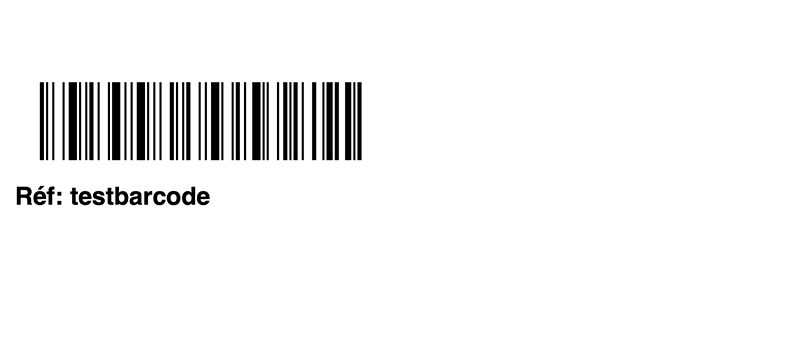
        barcode_code:"testbarcode",barcode_category:"Code128",pages:2
    }
   ) {
   __typename
    ... on RenderedDocument {
      url
    }
  }
}
Generated pdf screenshot for barcode:
Purchase Order Printing
To print a purchase_order you need to create a file named purchase_order.rml and upload it as a template.
Here is the example content: (You can customize it by keeping same variable names)
Example content for purchase_order.rml
<!DOCTYPE document SYSTEM "rml.dtd">
<!-- this filename isn't used -->
<document filename="purchase_order.pdf">
  <template>
    <pageTemplate id="firstpage" pageSize="a4 landscape">
      <pageGraphics>
        <place x="1cm" y="15cm" width="5cm" height="5cm">
          <blockTable style="infoTableStyle">
            <tr>
              <td>Company: {{purchase_order.stock_owner.name}}</td>
            </tr>
            <tr>
              <td>PO: {{purchase_order.id}}</td>
            </tr>
            <tr>
              <td>Type: {{purchase_order.type}}</td>
            </tr>
          </blockTable>
        </place>
      </pageGraphics>
      <frame id="first" x1="1cm" y1="2cm" width="28cm" height="18cm" />
    </pageTemplate>
    <pageTemplate id="otherpages" pageSize="a4 landscape">
      <frame id="second" x1="1cm" y1="2cm" width="28cm" height="18cm" />
    </pageTemplate>
  </template>
  <stylesheet>
    <blockTableStyle id="infoTableStyle">
      <blockAlignment value="left" />
      <blockFont name="Helvetica" size="9" />
      <blockTextColor colorName="black" />
      <lineStyle kind="OUTLINE" colorName="black" thickness="1" />
    </blockTableStyle>
    <blockTableStyle id="linesTableStyle">
      <blockAlignment value="left" />
      <blockFont name="Helvetica" />
      <lineStyle kind="GRID" colorName="black" />
      <lineStyle kind="OUTLINE" colorName="black" thickness="2" />
      <blockTextColor colorName="white" start="0,0" stop="-1,0" />
      <blockBackground colorName="#666666" start="0,0" stop="-1,0" />
      <blockBackground colorsByRow="None;0xDEDEDE" start="0,1" stop="-1,-1" />
    </blockTableStyle>
    <paraStyle name="titleBox" fontName="Helvetica-Bold" fontSize="18" spaceBefore="0.4 cm" alignment="CENTER" />
    <paraStyle name="barcodeBox" fontName="Helvetica" fontSize="12" spaceBefore="0.4 cm" alignment="CENTER" />
  </stylesheet>
  <story>
    <para style="titleBox">Purchase Order</para>
    <illustration width="7.5cm" height="2cm" align="CENTER">
      <barCode x="0" y="0" code="Code128" barWidth="1.0" barHeight="1cm">{{purchase_order.id}}</barCode>
    </illustration>
    <para style="barcodeBox">{{purchase_order.id}}</para>
    <spacer length="1cm" />
    <setNextTemplate name="otherpages" />
    <blockTable colWidths="7.5cm,8.5cm,3cm,3cm,3cm,3cm" style="linesTableStyle" longTableOptimize="0">
      <tr>
        <td>Product</td>
        <td>Description</td>
        <td>Quantity</td>
        <td>Max qty</td>
        <td>Received qty</td>
        <td>Reserved qty</td>
      </tr> {% for row in rows %} <tr>
        <td>{{row.id}}</td>
        <td>{{row.reservation}}</td>
        <td>{{row.quantity}}</td>
        <td>{{row.quantity_max}}</td>
        <td>{{row.received_quantity}}</td>
        <td>{{row.reserved_quantity}}</td>
      </tr> {% endfor %}
    </blockTable>
  </story>
</document>